


The Complete Guide to Website Redesign: A Checklist to Protect Your SEO
Last Updated: 3 days ago

SUMMARY: A website redesign protects SEO when you benchmark current rankings and traffic, map every old URL to its new equivalent with 301 redirects, keep high-performing content, and test speed, mobile usability, and tracking before and after launch.

A new design can make a website look better and still cost the business its search traffic if the move is not planned. The fix is a checklist: know what is working before anything changes, map every old address to a new one, and test before and after launch. This guide gives you that website redesign checklist, and shows how to redesign your website without losing SEO along the way.
Before You Start: Benchmark What Is Already Working
Website redesigns work best when your website has a quantifiable problem you can solve. For example, you might redesign your site to:
- Lower your bounce rate
- Raise your conversion rate
- Improve your user experience (UX) or your site’s responsiveness
- Improve your website’s SEO
- Update a dated design
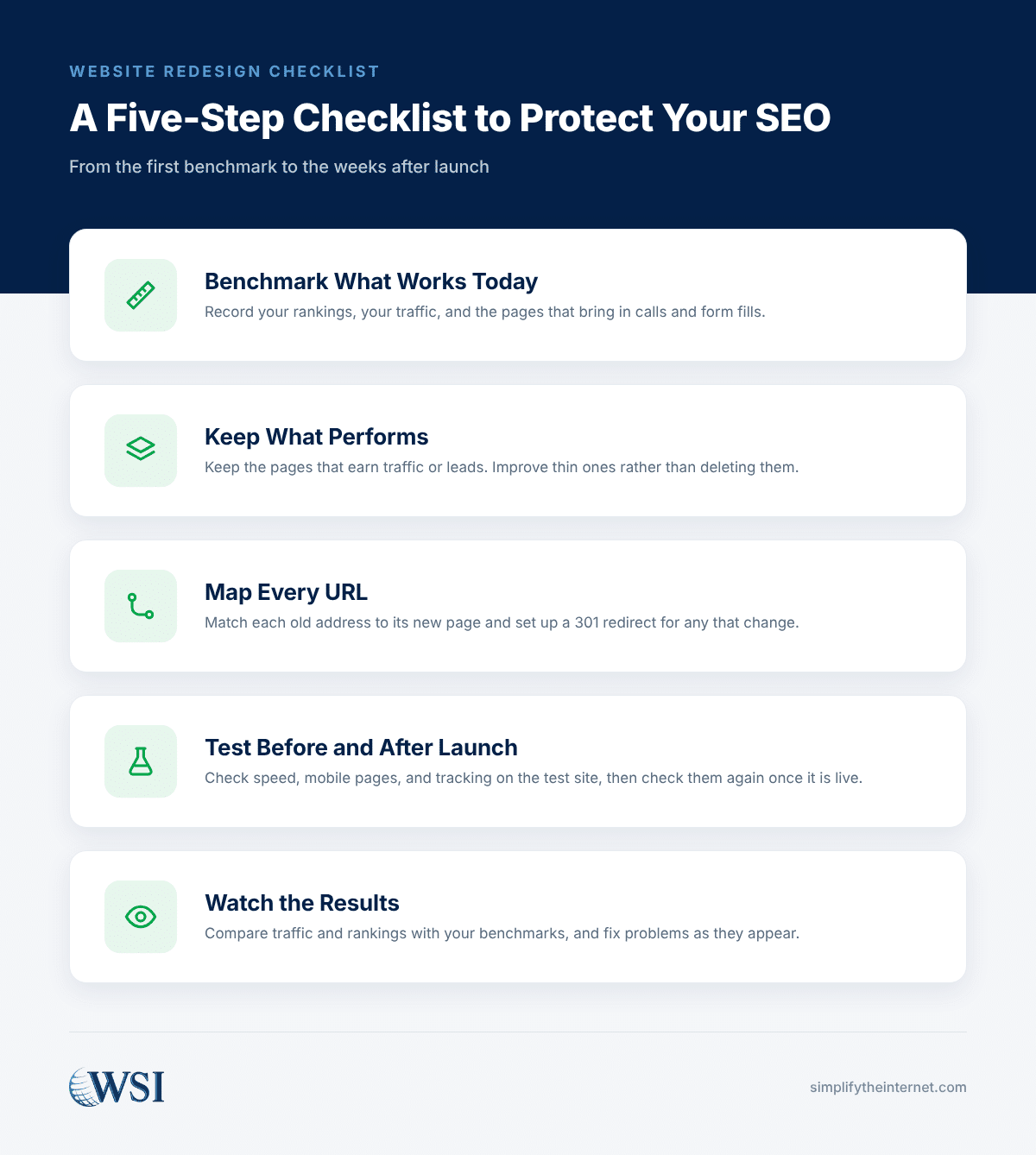
You cannot measure a problem without a starting point, so record where the site stands today. Note the pages that rank best and the keywords they rank for, your monthly organic traffic, the pages that bring in calls and form fills, your load speed, and how usable the site is on a phone. A website SEO audit gathers much of this in one place and shows which pages are earning their keep, so you know what to protect. These numbers become the benchmarks for your goals and the comparison point after launch.
Your competitors are worth a look too. Identify your number one competitor and examine their website closely: what it looks like, what features it offers, and how its pages are organized. Use SEO tools to see which keywords they use and how high they rank for each one. You can also run user interviews and session recordings to see what real people think of their site.
Planning Structure, Content, and URL Mapping
In general, the website redesign process takes up to 90 days, and more complex projects take longer. It runs in three phases: discovery, design, and launch. This section covers the first two, and the next covers launch.
Discovery sets out your goals and how you plan to reach them. It produces a redesign plan with detailed steps and milestones you can use to track your agency’s progress. Use your benchmarks to set the scope: which KPIs do you want to improve, and by how much? That gives the project a goal to aim for. Where you can, make changes gradually so you can see the effect of each one and build on your strongest results.
Next comes structure. A content-first approach builds a clean, streamlined sitemap around the pages your customers use. Your website redesign agency may also draw a customer journey map, a diagram of every route a lead might take on the way to becoming a customer. Any page should lead to your checkout or contact page in a few clicks. The sitemap also shows how each page links to the others, which helps both navigation and SEO.
Then take inventory of your content. List every page and note which ones bring in traffic or leads. Keep what performs, improve what is thin, and retire only what no longer serves a purpose. Removing strong content is one of the quickest ways for a redesign to hurt SEO.
URL mapping is the step that protects your rankings. Build a simple spreadsheet with every current address in one column and its new address in the next. Any address that changes gets a 301 redirect, which tells browsers and search engines the page has moved for good. Google’s guidance on site moves with URL changes puts the same order on it: map first, set up server-side redirects, then monitor traffic on both the old and new addresses. Point each old address straight to its final page rather than through a chain of redirects.
The design phase comes once the structure is settled. Your layout is turned into mock-ups showing how each page looks and works, and you sign off on them before any coding begins. Designers, UX specialists, and SEO specialists should work from the same plan, so that page titles, headings, and internal links carry over. Our website design and development services include redesigns of existing sites.
Launch-Day Checks That Protect Rankings and Leads
Before the site goes live, test it for bugs and usability problems. You can use an internal testing team, or start with a soft launch that releases the site to a limited part of the public. If you can, pick a quieter stretch for your business, since Google advises making a move during lower-traffic periods where possible.
Check these before launch, and again once the site is live:
- Redirects: open a sample of old addresses and confirm each one lands on the right new page.
- Speed: test load times on your key pages. Core Web Vitals are three measures of real-world page experience: how fast the main content loads, how quickly the page responds to a tap or click, and how steady the layout stays.
- Mobile: view every key page on a phone, including menus and forms.
- Tracking: confirm analytics and conversion tracking record visits, calls, and form submissions.
- Search access: make sure search engines are allowed to crawl the new site, and submit the new sitemap.
Launch is not the end of the work. Keep watching your performance and user statistics, fix problems as they appear, and compare traffic and rankings with your benchmarks. Google says to expect temporary fluctuation in rankings during a move, so judge the results over weeks, not days. To see how we approach testing and launch for businesses in the area, visit our web design in Aurora page.
When to Redesign vs. Refresh Your Website
You may have heard “website redesign” and “website refresh” used interchangeably, but they are not the same. A refresh updates how the site looks. A redesign is much larger in scope: in addition to style changes, it typically makes functional changes, such as improving load speeds, optimizing indexing, and adding third-party plug-ins to unlock new features. Unless you need an extensive overhaul that adds functionality, a refresh may be the better option.
Redesign services come in four main types:
- Redecoration: changes the look of your website. Your web design agency might add more images or video, adjust your brand colours, or update your logo, graphics, and other visuals. It is the most limited, and most affordable, form of redesign.
- Rewire: updates back-end features, including your code and data storage. For example, you might move to a cloud hosting service for better performance, or update your checkout security during an ecommerce website redesign.
- Remodel: combines redecorating and rewiring for significant front-end and back-end updates. It takes significant investment, but the changes can lead to noticeable gains in traffic, conversions, and sales.
- Rebuild: the most intensive form, rebuilding your website from the ground up with new graphics, navigation, back-end code, and current SEO practices.
Which type you need depends on the problem you found when you benchmarked the site, and so does the price. Our guide to website redesign cost explains what moves it.
There is no one-size-fits-all benchmark for when a redesign is due. If the site is not helping you meet your goals, performs poorly on mobile, is hard to update, or lacks features your competitors have added, it may be time for a change. Many businesses find the question comes up every two to three years. Keep an eye out for major industry changes and shifts in your own brand and focus, because your website should always reflect who your company is today. Our website redesign services include WordPress redesigns, Shopify redesigns, and more.
Frequently Asked Questions
Will a Website Redesign Hurt My SEO?
It can if URLs change without redirects or strong content is removed. A planned migration with a URL map, 301 redirects, and post-launch monitoring helps protect existing rankings, although they can still move for a while after launch.
How Often Should a Business Redesign Its Website?
There is no fixed rule. A redesign makes sense when the site no longer supports your goals, performs poorly on mobile, or is difficult to update, rather than on a set schedule. Some businesses find the question comes up every two to three years, but your goals should set the timing, not the calendar.
What Should a Website Redesign Checklist Include?
At minimum: a performance benchmark, a full URL map and redirect plan, a content inventory, analytics and conversion tracking checks, and speed and mobile testing before and after launch. Not sure how this list applies to your site? We will go through it with you when you book a free consultation.

Don't stop the learning now!
Here are some other blog posts you may be interested in.
VIEW ALL BLOG POSTS-
How an Expert Agency Designs a User-Friendly Website
Have you ever thought about what your users do on your company’s website? Usability and user experience are major focus …
READ MORE -
How to Choose a Web Development Company in Toronto
Choosing a web development company is easier when you know what you need and what to ask before the first call. This guide covers what to look for before you shortlist, ten checks to run…
READ MORE -
How a Poor Website Can Damage your Business
Website design in Toronto is constantly evolving. Once, only the biggest companies had websites. Now, they …
READ MORE